Issue: My device won't pair or my device pairs in bluetooth but will not connect to my car.
Response:
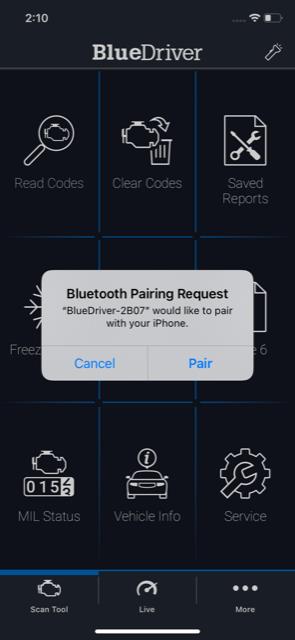
You have a newer BlueDriver device that uses Bluetooth LE, which pairs within the app—not through your phone’s Bluetooth settings.
Note: The first time you open the app, it will ask for Bluetooth permission. This is required for in-app pairing.
Please follow these steps:
- Fully close the BlueDriver app so it’s not running in the background.
- For iPhones with a physical Home button (iPhone 9 and older):
- Double-tap the Home button
- Swipe through open apps
- Swipe up or down on the BlueDriver app to close it
- For iPhones without a Home button (iPhone X and newer):
- From the Home screen, press and hold the bottom of the screen, then swipe up
- Swipe through open apps
- Swipe up or down on the BlueDriver app to close it
- For Androids
- Tap the Recent Apps button (usually a square or swipe-up gesture)
- Swipe the BlueDriver app off the screen to close it
- For iPhones with a physical Home button (iPhone 9 and older):
- Start your vehicle’s ignition and plug in your BlueDriver.
Note: You have 60 seconds to pair the sensor. If more than a minute passes, unplug and replug the device to restart pairing mode. - Open the BlueDriver app.
- Within 5–20 seconds, the app should detect the sensor and prompt you to pair
- Tap Pair, and the app will complete the pairing and connect to your vehicle automatically.
Was this article helpful?
That’s Great!
Thank you for your feedback
Sorry! We couldn't be helpful
Thank you for your feedback
Feedback sent
We appreciate your effort and will try to fix the article